How to Create Smarter Subagents for Local LLMs Using Ollama, AnythingLLM, and MCP Admin
Local LLMs are fast, private, and free to run. They also have limits. A small model running on your laptop can summarize notes and answer simple questions, but it struggles with multi-step reasoning, deep research, and heavy tool use.
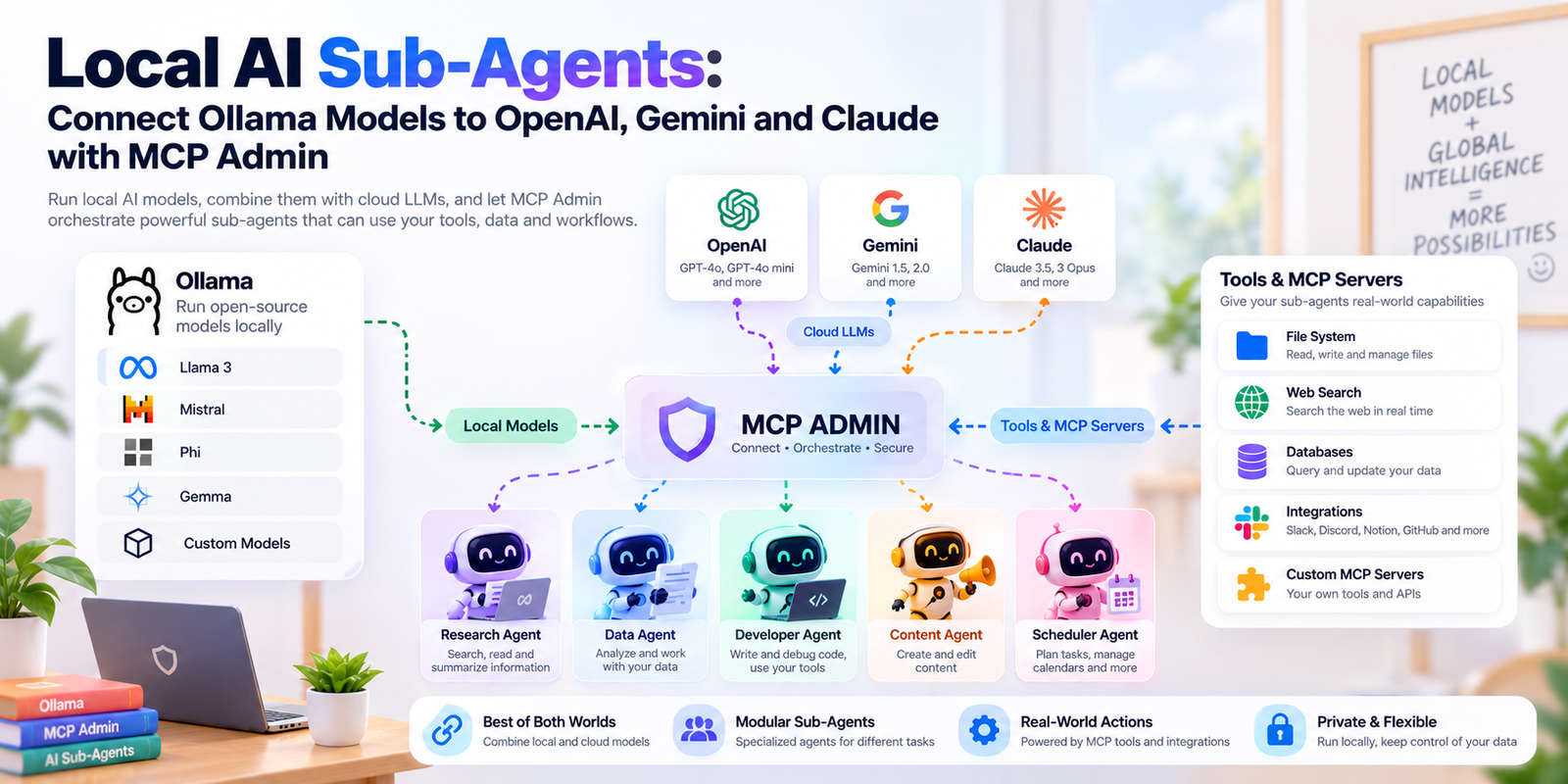
You don’t have to choose between local privacy and cloud intelligence. With subagents, your local model can hand off hard tasks to a more capable cloud model, on demand. In this guide, you’ll set that up using Ollama, AnythingLLM, and MCP Admin.
What Is a Subagent?
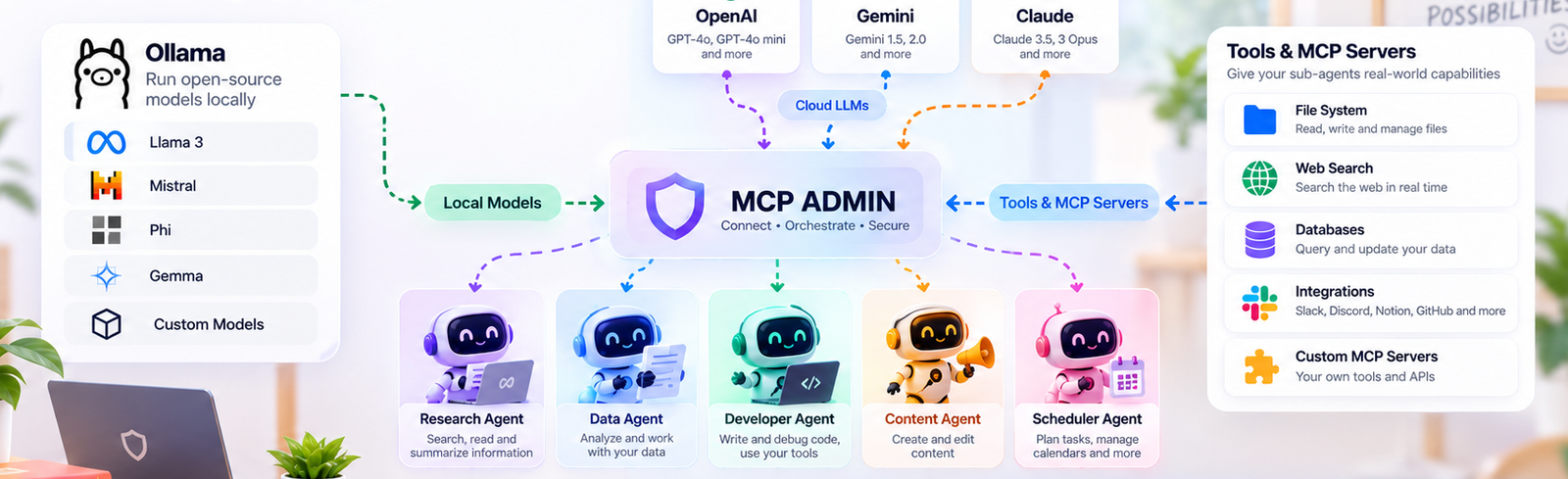
A subagent is a specialized agent that a main agent delegates to. Your local model is the generalist. When a task is beyond it, it calls a subagent that has a stronger model, its own instructions, and its own tools.
The benefits:
- Cost control: the cloud model only runs when the local one asks for it.
- Privacy by default: routine work never leaves your machine.
- Specialization: each subagent can have its own prompt and toolset (research, coding, analysis).
How the MCP Admin Architecture Works
Here’s the flow, so each step makes sense as you go:
- AnythingLLM is your chat interface and agent runner.
- Ollama serves a local model such as Qwen3 to AnythingLLM.
- MCP Admin hosts your subagents and exposes them through an MCP server on mcpadmin.cloud.
- The MCP server offers an
ask_agenttool. - When your local model decides a task is too complex, it calls
ask_agent, and the subagent runs on ChatGPT, Gemini, or Claude with its own tools. - The answer comes back to your local model, which presents it to you.
Your local model never needs an API key for the cloud providers. It only needs to know how to reach the MCP server.
What You’ll Need
- A computer that can run a local model (8 GB+ RAM recommended for smaller models)
- Ollama installed
- AnythingLLM (Desktop or Docker)
- An MCP Admin account at mcpadmin.cloud
- An account with at least one cloud provider (ChatGPT, Gemini, or Claude) for your subagent to use
Step 1: Install Ollama and Pull a Local Model
Install Ollama from ollama.com, then pull a model that supports tool calling. Qwen3 is a good choice:
bash
ollama pull qwen3
ollama run qwen3
Confirm it responds in the terminal. Ollama serves its API locally at http://localhost:11434, which is what AnythingLLM will connect to.
Tip: choose a model with tool-calling support. Without it, your local model can’t invoke
ask_agent.
Step 2: Connect AnythingLLM to Ollama
Open AnythingLLM and go to your LLM provider settings
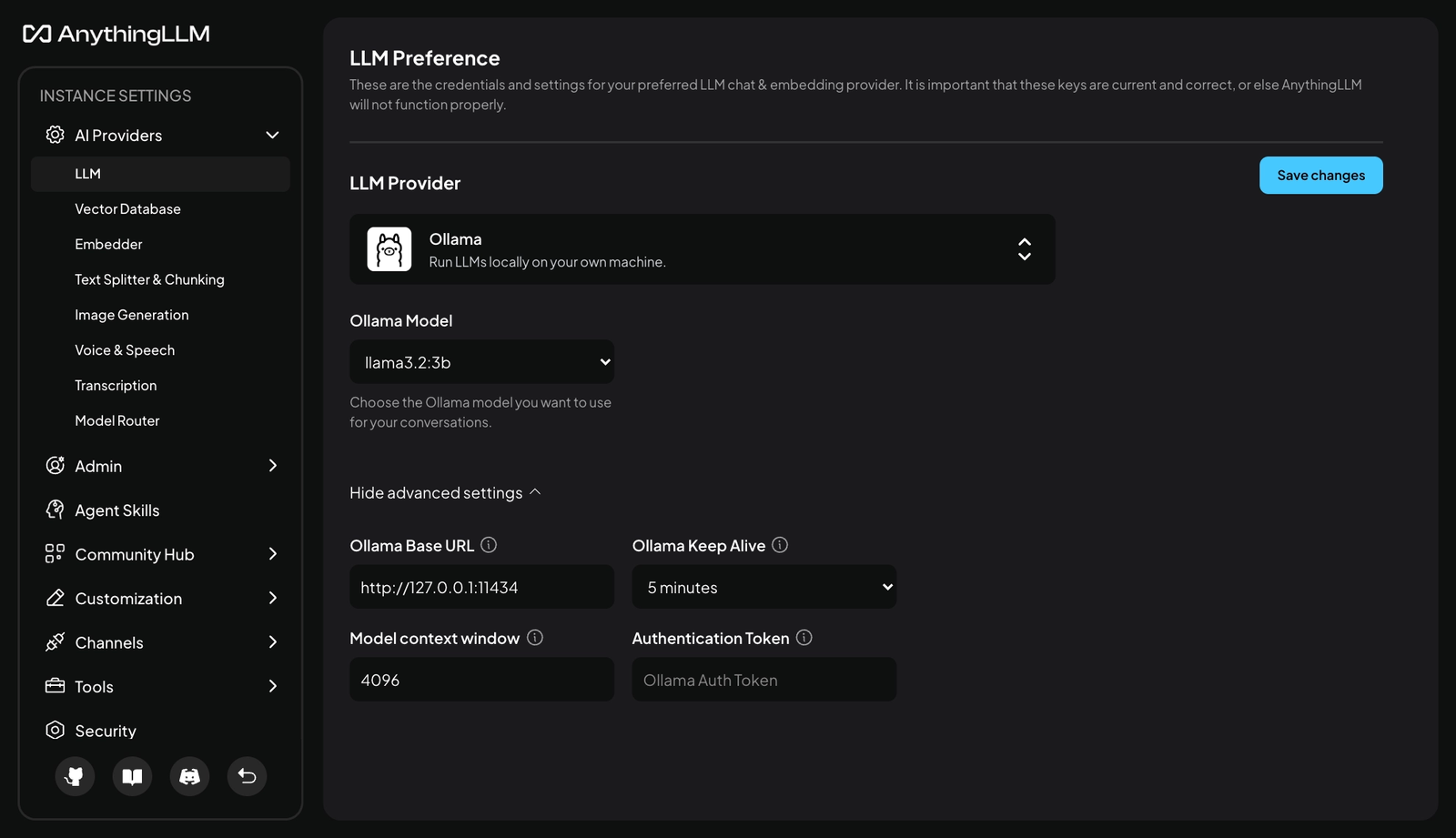
- Select Ollama as the provider.
- Set the base URL to
http://localhost:11434. - Choose your Qwen3 model.
- Save, then send a test message in a workspace.
If you get a reply, your local stack is working.
Step 3: Create Your Subagent in MCP Admin
Log in to MCP Admin at mcpadmin.cloud and create a new subagent:
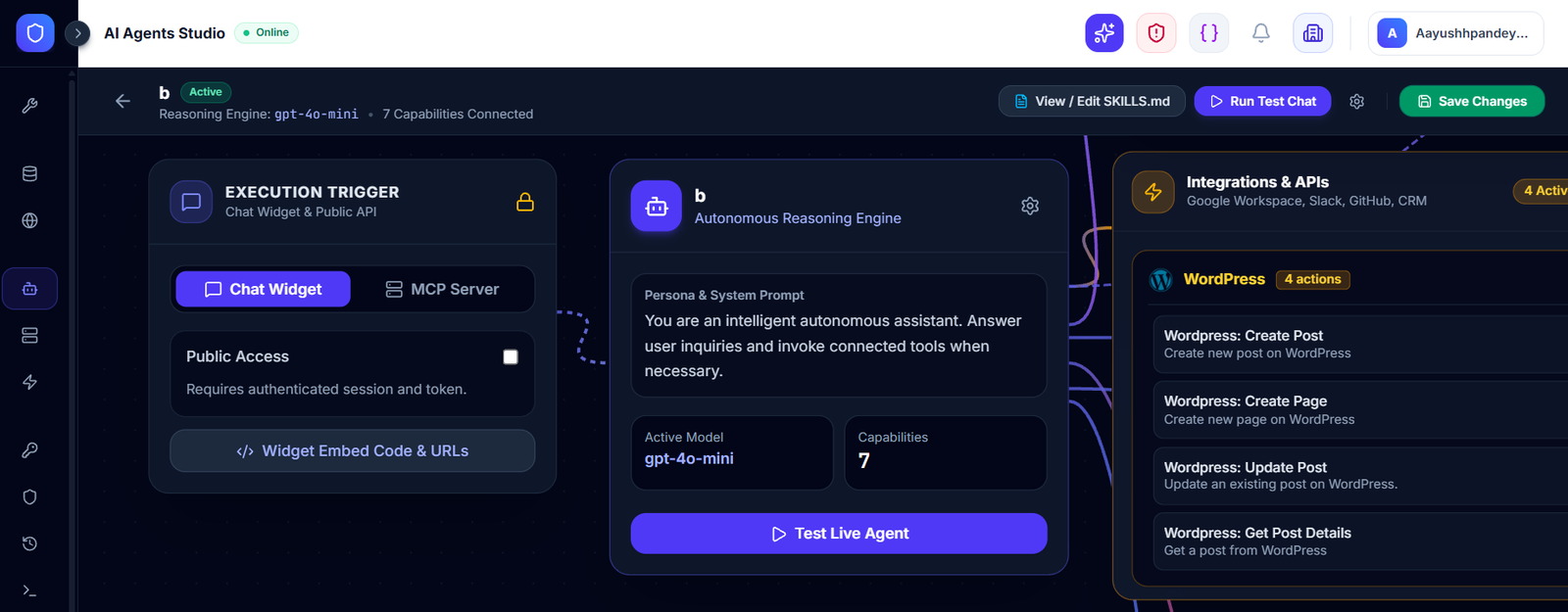
Decide these things up front:
- Provider: ChatGPT, Gemini, or Claude
- Role and instructions: for example, “You are a research analyst. Give sourced, structured answers.”
- Tools: the tools this subagent can use on its own
A narrowly defined subagent beats a vague one. If you need research and coding help, create two subagents instead of one do-everything agent.
Step 4: Get Your MCP Server Endpoint
MCP Admin exposes your subagents through an MCP server and offers the ask_agent tool. Copy the server URL from your dashboard:
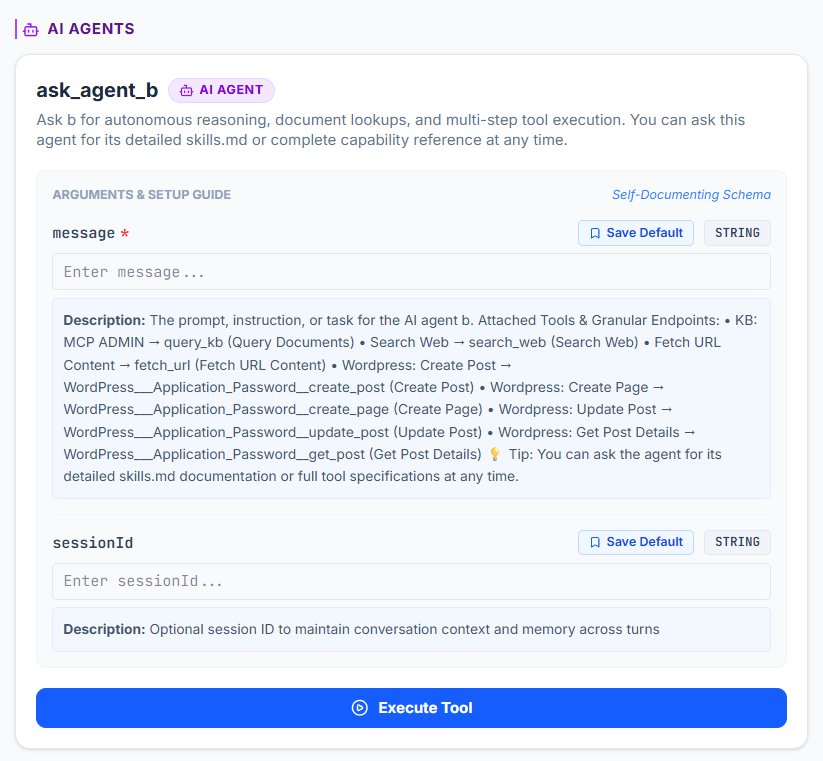
This URL is the only thing your local setup needs. The provider keys stay on the MCP Admin side, so nothing sensitive sits in your local config.
Step 5: Add the MCP Server to AnythingLLM
In AnythingLLM, open the agent skills / MCP settings and add your MCP Admin server using the URL from Step 4:
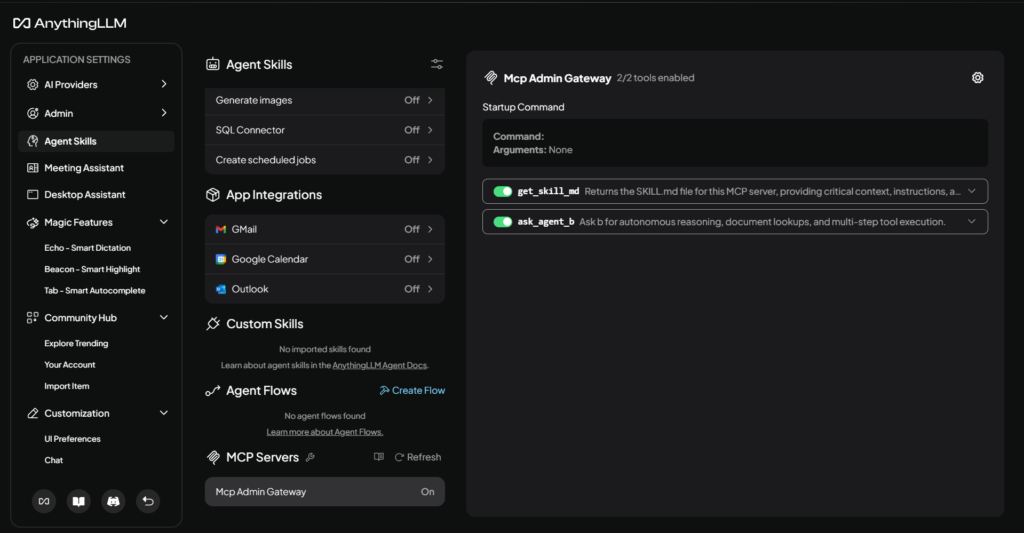
Once connected, AnythingLLM should list ask_agent as an available tool. Make sure agent mode is enabled in your workspace so the local model can call it.
Step 6: Test the Delegation
Start with a simple prompt to confirm your local model handles it alone:
“Summarize the benefits of local LLMs in three bullets.”
Then try something it should hand off:
“Compare three approaches to RAG chunking, explain the tradeoffs with examples, and recommend one for legal documents.”
Watch for the ask_agent call in the agent output. The subagent runs on the cloud provider, returns its answer, and your local model presents it back to you.
How to Make Your Subagents Smarter
Setup is the easy part. These habits make the delegation actually work well:
1. Write clear tool-use instructions in your system prompt. Tell your local model when to delegate. For example: “Answer simple questions yourself. Use ask_agent for multi-step research, complex code, or anything requiring up-to-date information.”
2. Specialize each subagent. One role per subagent, with focused instructions and only the tools it needs.
3. Match the provider to the job. Use whichever of ChatGPT, Gemini, or Claude suits the task, and change it without touching your local setup.
4. Send complete context. The subagent only knows what the local model passes along. Encourage your model to include the full question, constraints, and desired output format.
5. Keep the local model in charge of presentation. Since answers return to your local model, you can have it reformat or condense the response in your preferred style.
Troubleshooting
ask_agentnever gets called: check that your local model supports tool calling and that agent mode is on. Make the delegation rule explicit in the system prompt.- Tool doesn’t appear in AnythingLLM: re-check the MCP server URL and restart the app.
- Slow responses: the cloud subagent adds latency. That’s expected for complex tasks, which is why simple ones stay local.
- Weak delegation decisions: smaller models sometimes under-delegate. Try a larger local model or tighten your instructions.
Why This Architecture Is Worth It
- Local-first: everyday prompts stay on your machine.
- No cloud keys on the local side: only the MCP server address is needed.
- Centralized management: update a subagent’s provider, prompt, or tools in one place.
- Scalable: add more subagents as your workflows grow.
Conclusion
A local LLM doesn’t have to be limited by its size. With Ollama, AnythingLLM, and MCP Admin, you get a setup where your local model decides when to call in reinforcements, and the heavy lifting happens only when it’s needed.
Try it with one subagent, test it with a hard prompt, and expand from there.
Ready to build yours? Sign up at mcpadmin.cloud.