What Is MCP Admin? A Complete Guide to AI Agent Orchestration, MCP Gateways, and Governance
AI agents are becoming more capable, but deploying them reliably requires more than connecting a language model to a few APIs. Production systems need tool discovery, credential isolation, permission boundaries, predictable workflows, human approval for sensitive actions, and visibility into what agents actually do.
MCP Admin is designed to bring these capabilities into one control plane. Built around the Model Context Protocol (MCP), it combines a centralized MCP gateway with visual agent-building tools, integrations, automation pipelines, retrieval-augmented generation (RAG), credential management, and governance controls.
This guide explains MCP Admin’s documented architecture, the problems it is intended to solve, its core modules, practical use cases, and the considerations teams should evaluate before deploying agentic workflows in production.
What Is MCP Admin?
MCP Admin is an orchestration and governance platform for connecting AI agents and compatible clients to tools, APIs, data sources, and workflows. Instead of configuring every integration independently in every client, teams can use a central gateway to expose selected capabilities through a consistent interface.
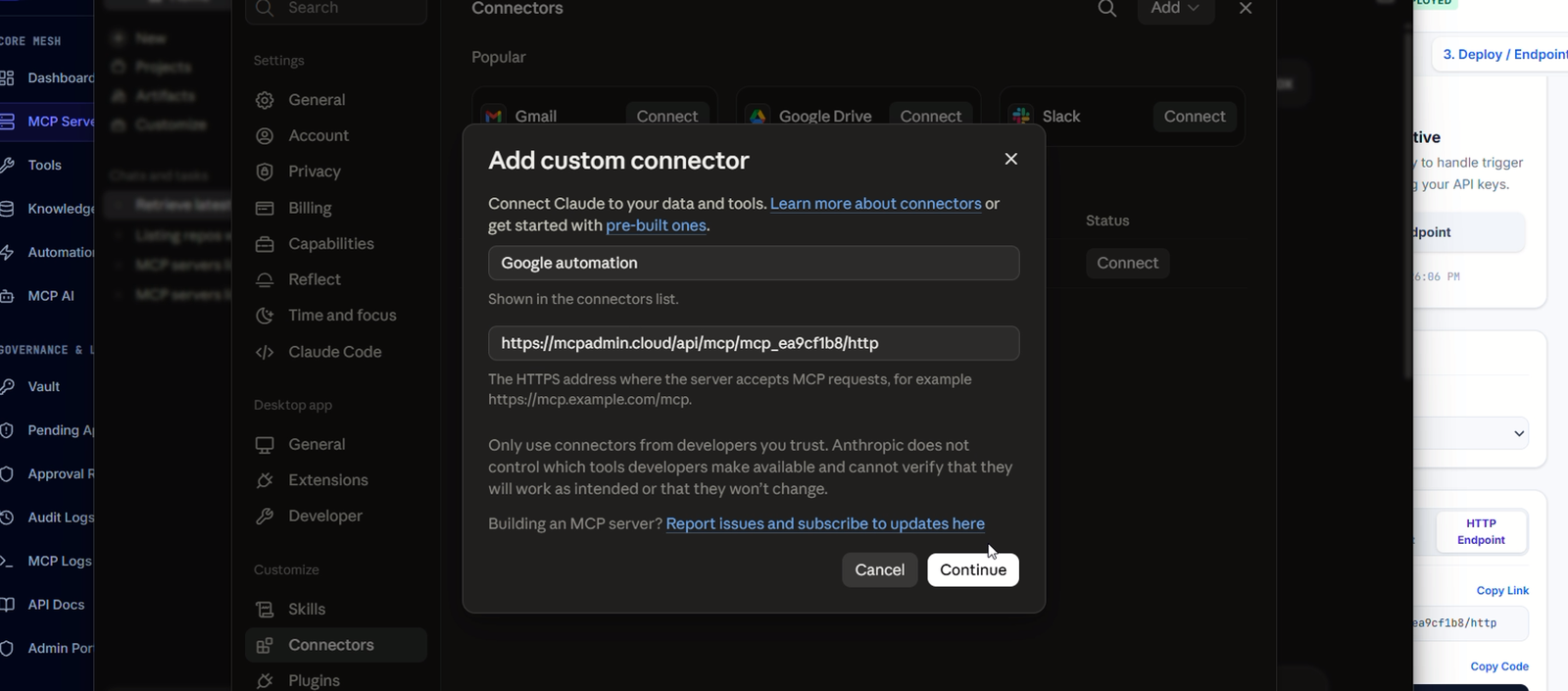
The platform’s documented ecosystem includes developer clients such as Cursor, Windsurf, Claude Desktop, and VS Code, along with LLM providers such as OpenAI, Anthropic’s Claude, and Google Gemini. Actual compatibility depends on the configured client, provider, and deployment.
At a high level, MCP Admin brings together six jobs:
- Connect: Bring integrations, remote MCP servers, REST APIs, and custom tools into a unified environment.
- Build: Visually assemble MCP gateway topologies and AI agents.
- Orchestrate: Run deterministic, multi-step automation pipelines.
- Ground: Give agents access to internal documents and web research through retrieval tools.
- Govern: Manage credentials, permissions, and approval requirements for sensitive actions.
- Observe: Inspect tool executions and use logs and telemetry to understand system behavior.
Why a Centralized MCP Control Plane Matters
Without a shared control plane, teams can end up maintaining separate server configurations, credentials, tool definitions, and access rules for each AI client. As the number of agents and integrations grows, that fragmentation makes it harder to understand which agent can access which capability.
A centralized approach can simplify this environment by providing a common place to configure tools, manage access, validate inputs, and observe execution. It also helps separate an agent’s reasoning from the infrastructure that performs the requested action.
This distinction is important: an AI model can decide that it should update a record or send a message, but the platform around it should determine whether the requested operation is available, whether its inputs are valid, which credentials are used, and whether human authorization is required.
1. The Master MCP Gateway
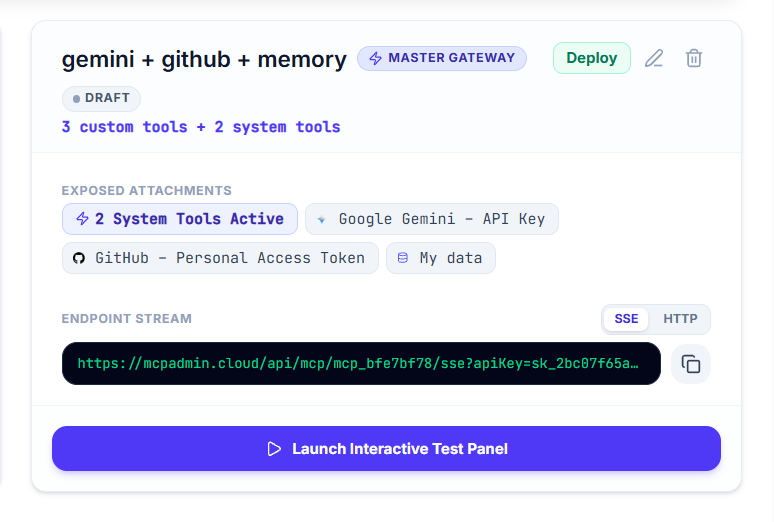
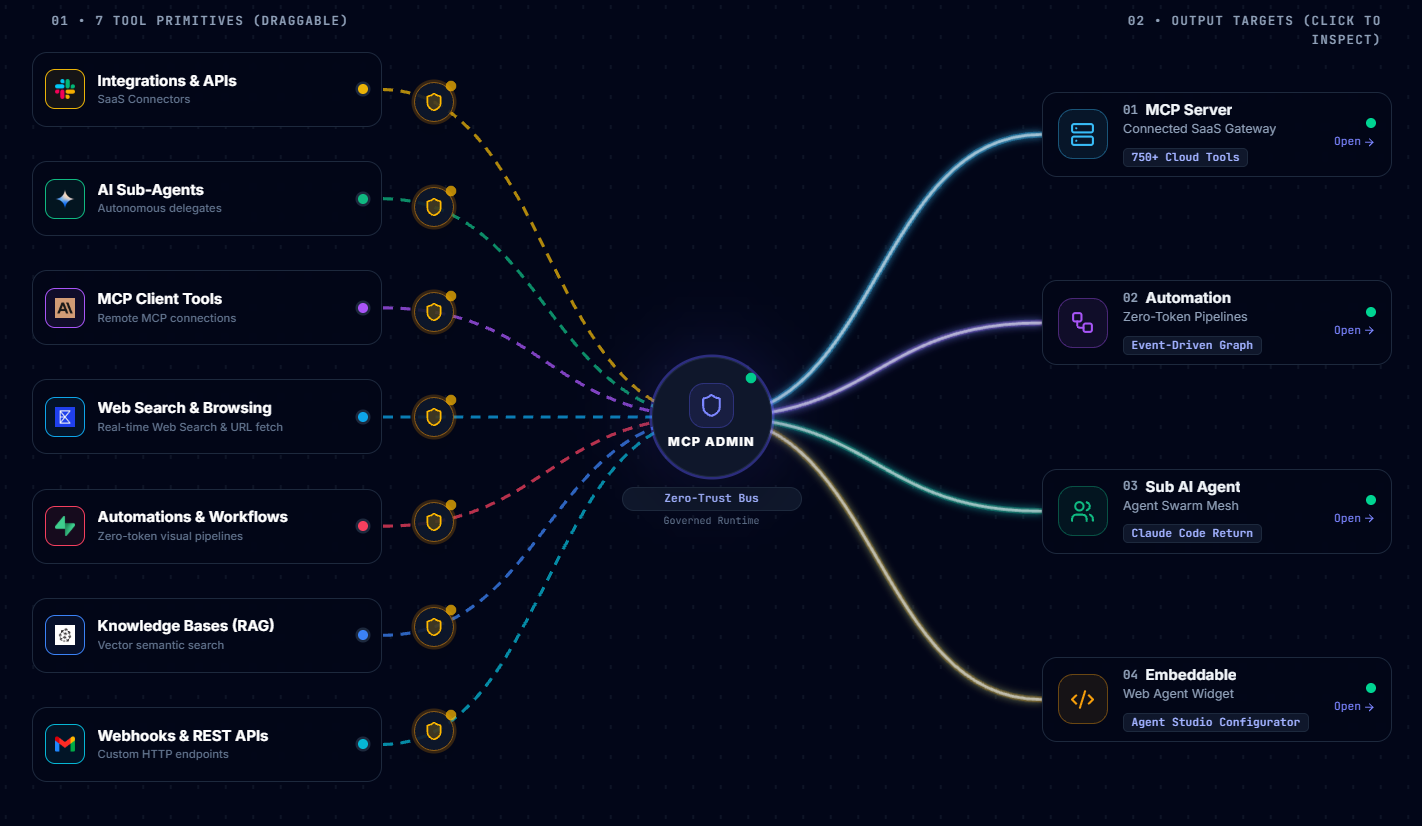
The Master MCP Gateway is the central routing layer described in MCP Admin’s architecture documentation. It aggregates tools from configured integrations and other connected capabilities so clients can discover and invoke them through a common interface.
Documented gateway interfaces
| Interface | Documented route | Purpose |
|---|---|---|
| Master SSE | /api/mcp/master/sse |
Persistent, streaming MCP client connections |
| Gateway SSE | /api/mcp/:id/sse |
Streaming access to a specific gateway |
| Master HTTP | /api/mcp/master/http |
Stateless HTTP JSON-RPC requests |
| Gateway HTTP | /api/mcp/:id/http |
Stateless requests to a specific gateway |
These routes are listed in the retrieved architecture guide. Confirm the current endpoint paths and authentication requirements in your own deployment before using them in production.
The guide identifies standard MCP operations including tools/list, tools/call, prompts/list, and resources/list. It also describes request validation against tool schemas so missing parameters and type mismatches can be caught before downstream execution.
Why this matters
- Clients can use a common entry point instead of maintaining separate connections to every service.
- Tools can be exposed selectively instead of granting an agent an entire integration’s action set.
- Schema validation creates a boundary between model-generated arguments and downstream APIs.
- Centralized routing creates a useful place to apply access controls and collect execution telemetry.
2. Visual MCP Gateway and AI Agent Builders
MCP Admin documents two node-based visual environments: a gateway canvas for organizing connected capabilities and an agent canvas for configuring AI agents.
The MCP Gateway Canvas
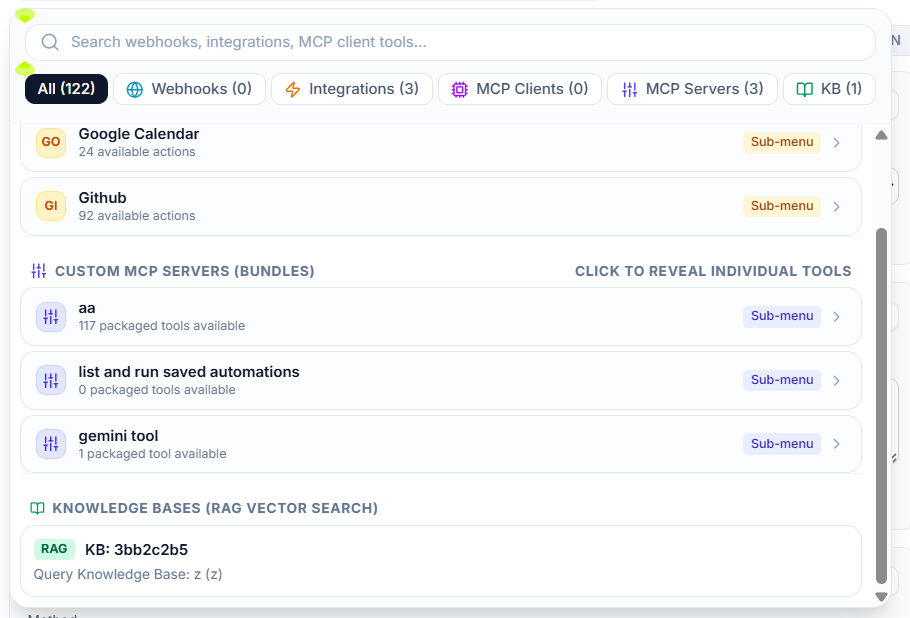
The gateway canvas is intended to map the connections between the central gateway and capabilities such as:
- Integration suites and APIs
- Remote MCP clients and servers
- Custom REST webhooks
- Standalone MCP gateways
- Vector knowledge bases
- Web search
- Background automations
The architecture guide describes movable nodes, visual connections, and saved canvas layout state. This gives teams a visual way to organize their integration topology rather than relying exclusively on configuration files.
The AI Agent Canvas
The agent builder is described as supporting system prompts, model selection, temperature settings, context-window configuration, and tool assignment. A testing interface is also documented for trying multi-turn conversations and inspecting tool-call payloads and latency.
One useful capability is granular tool assignment. For example, an agent might need permission to send a message through a communication integration but not to manage users or change administrative settings. Exposing only the necessary action follows the principle of least privilege.
MCP Admin also documents embeddable chat widgets, including configurable appearance and suggested prompts, for placing an agent on an external website. Test the generated widget and its permissions in a non-production environment before publishing it publicly.
3. Integrations, Custom Tools, and REST Webhooks
MCP Admin’s integration layer is designed to connect external services to agents and gateways. The architecture guide names services such as GitHub, Slack, Gmail, Google Drive, Google Sheets, Notion, HubSpot, Stripe, Jira, Discord, WordPress, Telegram, Airtable, and Salesforce.
The retrieved Tools & Integrations dashboard preview specifically lists deployed OpenAI and WordPress integration suites. It describes the OpenAI suite as covering model APIs, text-to-speech, transcription, image generation, and embeddings, and the WordPress suite as supporting post creation, page updates, media management, category retrieval, and SEO article drafting. The preview is not a complete live inventory of every available integration.
Attach only the actions an agent needs
Integration suites may contain many operations. MCP Admin’s documentation describes both attaching an entire suite and selecting individual actions. Selective attachment is generally the safer starting point: expose the smallest useful set of operations and expand access only when a concrete workflow requires it.
Build custom tools
The platform also documents custom serverless JavaScript tools and configurable REST webhooks. Webhook methods include GET, POST, PUT, DELETE, and PATCH, with support described for custom headers, request bodies, and dynamic variable substitution.
Custom tools make it possible to integrate internal services or APIs that do not have a ready-made connector. Their inputs, authentication, timeouts, error responses, and side effects should be documented and tested just as carefully as those of a prebuilt integration.
4. Deterministic Automations and Pipelines
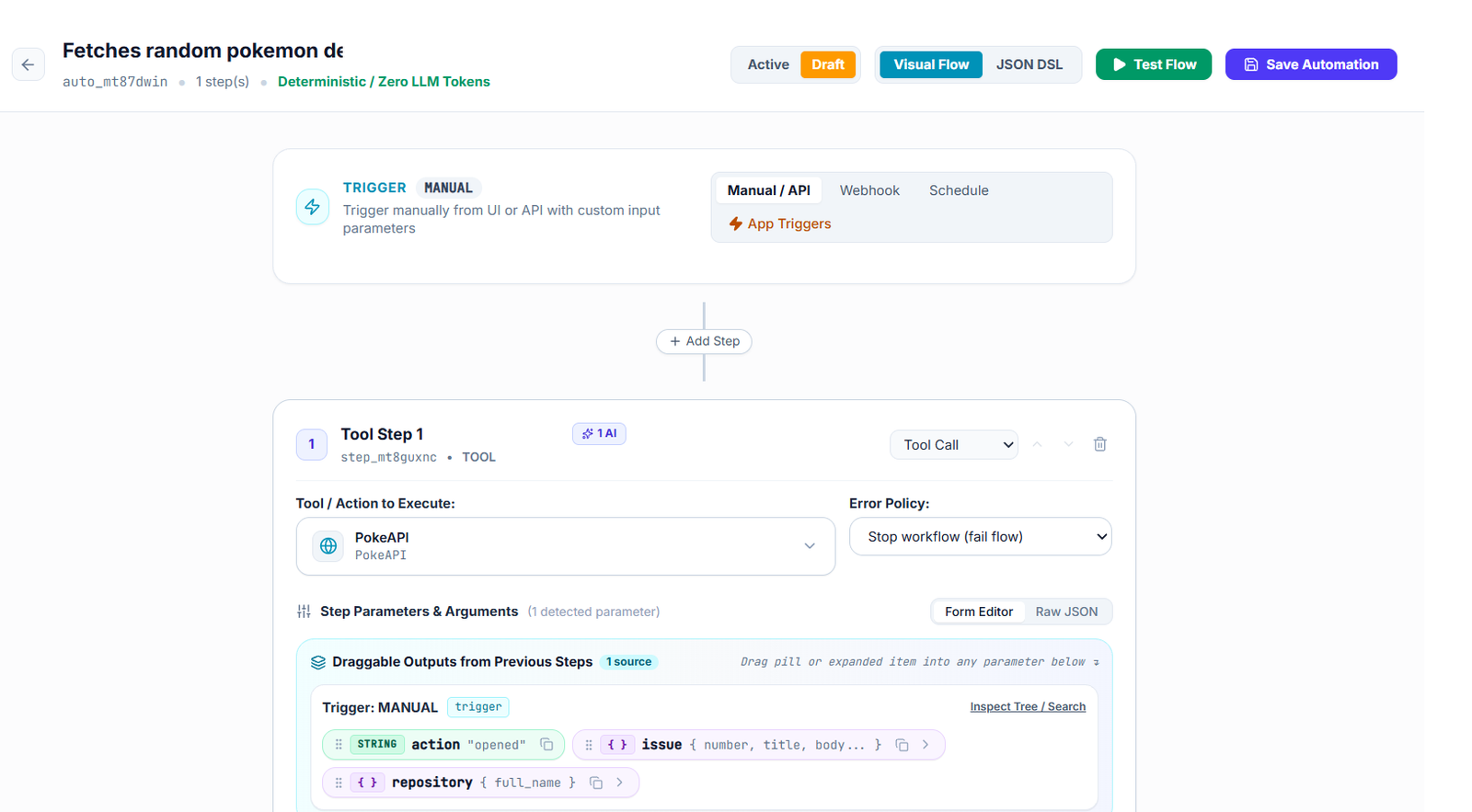
Not every task needs an LLM to reason through every step. Many workflows are predictable once the intent and input data are known. MCP Admin’s automation engine is intended to execute such workflows as deterministic pipelines.
Documented pipeline capabilities include:
- Chaining tool calls and transformations
- Conditional branches
- Delays and alerts
- Webhook-based triggers
- Scheduled cron triggers
- Manual execution
- Invocation by an AI agent as a callable tool
Dynamic variables
The documentation provides examples of the templating syntax used to pass information between steps:
{{input.customerId}}— a value supplied to the workflow{{steps.step_1.output.email}}— a value returned by a previous step{{env.API_SECRET}}— a reference to an environment secret{{timestamp}}and{{isoDate}}— execution-time metadata
Example: customer onboarding
- Receive a validated customer identifier through a webhook.
- Retrieve the customer record from the connected system.
- Check required fields and branch if information is missing.
- Create the necessary account or onboarding record.
- Send a notification and record the execution outcome.
This is an illustrative workflow, not a claim that a specific onboarding pipeline is already configured. In a real implementation, add idempotency controls, retries, timeout handling, and a recovery path for partially completed operations.
Because a deterministic pipeline can avoid repeated model reasoning between predictable steps, it may reduce latency and LLM usage. Actual savings depend on the workflow, the number of model calls it replaces, and infrastructure costs; performance claims should be measured against a baseline.
5. Knowledge Bases, RAG, and Web Research
Agents are more useful when they can retrieve relevant information instead of relying only on the model’s pre-existing knowledge. MCP Admin documents a retrieval-augmented generation (RAG) system that turns uploaded documents into searchable knowledge-base content.
Documented retrieval workflow
- Upload documentation, PDF manuals, Markdown files, or supported structured data.
- Parse the source material and divide it into chunks.
- Generate vector embeddings for the chunks.
- Store the vectors and associated content in a pgvector-backed repository.
- Retrieve relevant passages through semantic similarity search.
- Return matching context and source metadata to the requesting agent.
The dashboard preview retrieved for this guide reports two repositories, four indexed documents, 768-dimensional embeddings, and a 2 GB storage allowance. These are figures from the indexed preview, not a guarantee of current usage or plan entitlements.
Knowledge bases are described as exposing search tools with names such as query_kb_<id>. This allows an agent to search a specific corpus as part of a larger workflow.
Native web search
The architecture guide also describes web search and page-text extraction for researching current information, checking claims, and cross-referencing external sources. Internal knowledge and web search solve different problems: an internal corpus can contain private or organization-specific information, while web research can help with information that changes over time.
For reliable answers, agents should distinguish retrieved evidence from inference, preserve source references when possible, and avoid treating arbitrary document text as trusted instructions.
6. Credential Management and the Sandbox Vault
Credentials are a critical part of any agentic system. An agent that can call an API may be able to read private information or perform actions with real-world consequences.
MCP Admin’s documentation describes a Sandbox Vault intended to store API tokens, database connection strings, OAuth secrets, and service-account credentials using AES-256 encryption. It also describes server-side proxy injection, where the backend resolves a secret and inserts it into a downstream request rather than exposing the raw credential to the model.
An example documented variable is:
{{env.STRIPE_SECRET_KEY}}The intended principle is that a tool can refer to a credential by name while the backend handles the sensitive value during execution.
Security practices to apply
- Give each integration only the credentials and scopes it needs.
- Separate development, staging, and production secrets.
- Rotate credentials and revoke unused keys.
- Restrict gateway API keys by expiry, rate, and network where supported.
- Redact tokens, passwords, and personal data from logs.
- Test whether secrets can leak through tool outputs, exceptions, prompts, or browser-visible code.
Encryption and server-side injection are useful design controls, but they do not automatically make an entire deployment secure. The complete implementation, access policy, logging behavior, and operational procedures must also be reviewed.
7. Human-in-the-Loop Governance
Fully autonomous execution is not appropriate for every action. A workflow that drafts a response has a different risk profile from one that deletes records, issues refunds, sends a bulk message, or modifies production infrastructure.
MCP Admin documents a policy engine that can evaluate conditions such as tool classifications, regular expressions, parameter thresholds, and environment tags. When a request matches an approval policy, the documented flow suspends execution and creates an approval ticket for review.
Typical approval flow
- An agent requests a tool operation.
- The gateway evaluates the configured governance rules.
- A matching policy suspends the operation.
- An authorized reviewer examines the agent, tool, and requested parameters.
- The reviewer approves or rejects the request through the supported interface.
- If approved, execution resumes according to the configured workflow.
The guide describes dashboard and Telegram-based approvals. These can help reviewers respond without remaining at the development workstation, but the approval channel itself must be secured and restricted to authorized people.
Human approval should be based on the actual operation and its arguments—not merely on the fact that a familiar agent requested it. High-risk workflows should also have timeouts, rejection handling, duplicate-request protection, and a clear audit trail.
8. Organizations, Roles, and Auditability
The architecture guide describes organization workspaces with role-based access control. The documented roles are:
| Role | General purpose |
|---|---|
OWNER |
Organization ownership |
ADMIN |
Administrative management |
MEMBER |
Standard team access |
READ_ONLY |
Read-only access |
The guide also describes workspace isolation, team invitations, centralized billing, and separation of staging and production gateways. The precise permissions associated with each role should be checked in the live application before being relied upon.
For observability, the documented design records gateway connections, JSON-RPC activity, tool executions, parameters, response codes, and latency measurements. Real-time telemetry is intended to help administrators investigate failures and understand agent behavior.
Audit records can contain sensitive information. Apply access controls and retention rules, and avoid logging secrets or unnecessary personal data. A useful audit record should explain who or what initiated an action, which operation ran, whether approval was required, and what outcome occurred without unnecessarily exposing confidential payloads.
9. Practical Use Cases for MCP Admin
Developer productivity
Connect coding agents to selected repository, issue-tracking, documentation, and deployment tools through a shared gateway. Use granular tool assignment to limit the actions available to each agent.
Customer support
Combine a knowledge base, CRM integration, and support workflow. An agent can retrieve relevant policy information, look up a customer, and prepare a response. Sensitive changes can be routed through an approval step.
Business process automation
Use a model to interpret a request, then invoke a deterministic pipeline to validate inputs, update connected systems, and send notifications. This can make routine operations more consistent than an unconstrained chain of model-generated actions.
Internal knowledge assistant
Index approved company documents and expose semantic search to an agent. The assistant can answer questions using retrieved context, while web search can supplement the internal corpus when external information is needed.
WordPress content operations
Connect a WordPress integration to an agent that prepares SEO-oriented articles, updates pages, or retrieves categories. Publishing permissions should be granted deliberately, and content should be validated before publication when editorial risk warrants it.
Controlled administrative operations
Place approval policies around actions such as production database changes, bulk communications, or financial operations. This preserves automation for routine work while requiring human review where the consequences justify it.
10. Recommended Deployment Checklist
Before relying on an agent or workflow in production, use a structured rollout process.
- Define scope: Specify what the agent is intended to accomplish and what it must never do.
- Minimize permissions: Attach only the required tools and use narrowly scoped credentials.
- Validate schemas: Test required fields, invalid types, empty inputs, and unexpected model-generated arguments.
- Secure secrets: Verify storage, runtime injection, rotation, and redaction behavior.
- Test failure paths: Simulate API timeouts, rate limits, duplicate triggers, partial failures, and invalid responses.
- Configure approvals: Require review for high-impact actions and test both approval and rejection paths.
- Review observability: Confirm that useful execution details are recorded without exposing sensitive data.
- Separate environments: Test in a non-production workspace before enabling production credentials.
- Measure performance: Track latency, error rates, model usage, and the actual cost of representative workflows.
- Reassess access: Periodically review connected tools, shared credentials, workspace members, and API keys.
11. Frequently Asked Questions
Is MCP Admin just an MCP server?
No. Its documented scope is broader: it is intended to provide a control plane that aggregates MCP capabilities and combines them with agent building, integrations, automations, knowledge retrieval, credential management, and governance.
Does MCP Admin replace AI models?
No. The platform connects to model providers and gives agents access to tools and context. The model remains responsible for language understanding and reasoning; MCP Admin provides the surrounding integration and execution infrastructure.
Can I connect custom APIs?
The documentation describes configurable REST webhooks and serverless JavaScript tools for custom integrations. Exact configuration fields and supported runtime limits should be checked in the deployment.
Can an agent use private documents?
The documented RAG subsystem supports vector knowledge bases built from uploaded material. Access should be restricted so an agent can retrieve only information appropriate for its user and task.
Can sensitive tool calls require approval?
Yes, that is a documented design capability. The policy engine can suspend matching operations for human review, with dashboard and Telegram approval options described in the guide.
Does using deterministic automation eliminate LLM costs?
A deterministic pipeline can avoid additional model calls within the pipeline itself. However, a model may still be used to interpret the original request, and API, hosting, storage, and other operational costs remain.
Is every documented enterprise feature enabled by default?
Not necessarily. Documentation describes intended capabilities, not proof that each feature is enabled in every workspace. Verify availability, permissions, configuration, and behavior in the actual environment.
Conclusion
MCP Admin brings together the building blocks required to manage a growing ecosystem of AI agents: a unified MCP gateway, visual builders, integration tools, deterministic pipelines, knowledge retrieval, credential controls, human approvals, and administrative observability.
Its central architectural idea is to separate an agent’s reasoning from the infrastructure that carries out its requests. With careful tool scoping, secure credential handling, validated inputs, meaningful approval policies, and reliable monitoring, this approach can make AI-powered workflows easier to manage and govern.
The most effective way to adopt a platform like MCP Admin is to start with a narrow, measurable workflow, verify its execution and failure behavior, and expand its capabilities only as the required controls are in place.
Explore MCP Admin: Visit MCP Admin to learn more about the platform and its approach to AI agent orchestration.