MCP server security is becoming a critical part of securing AI agents. Model Context Protocol (MCP) servers can connect an AI application to APIs, databases, files, developer tools, and business systems. That power also creates a larger attack surface: a compromised server, over-privileged tool, unsafe OAuth implementation, or malicious tool response can turn an AI integration into a path to sensitive data or high-impact actions.
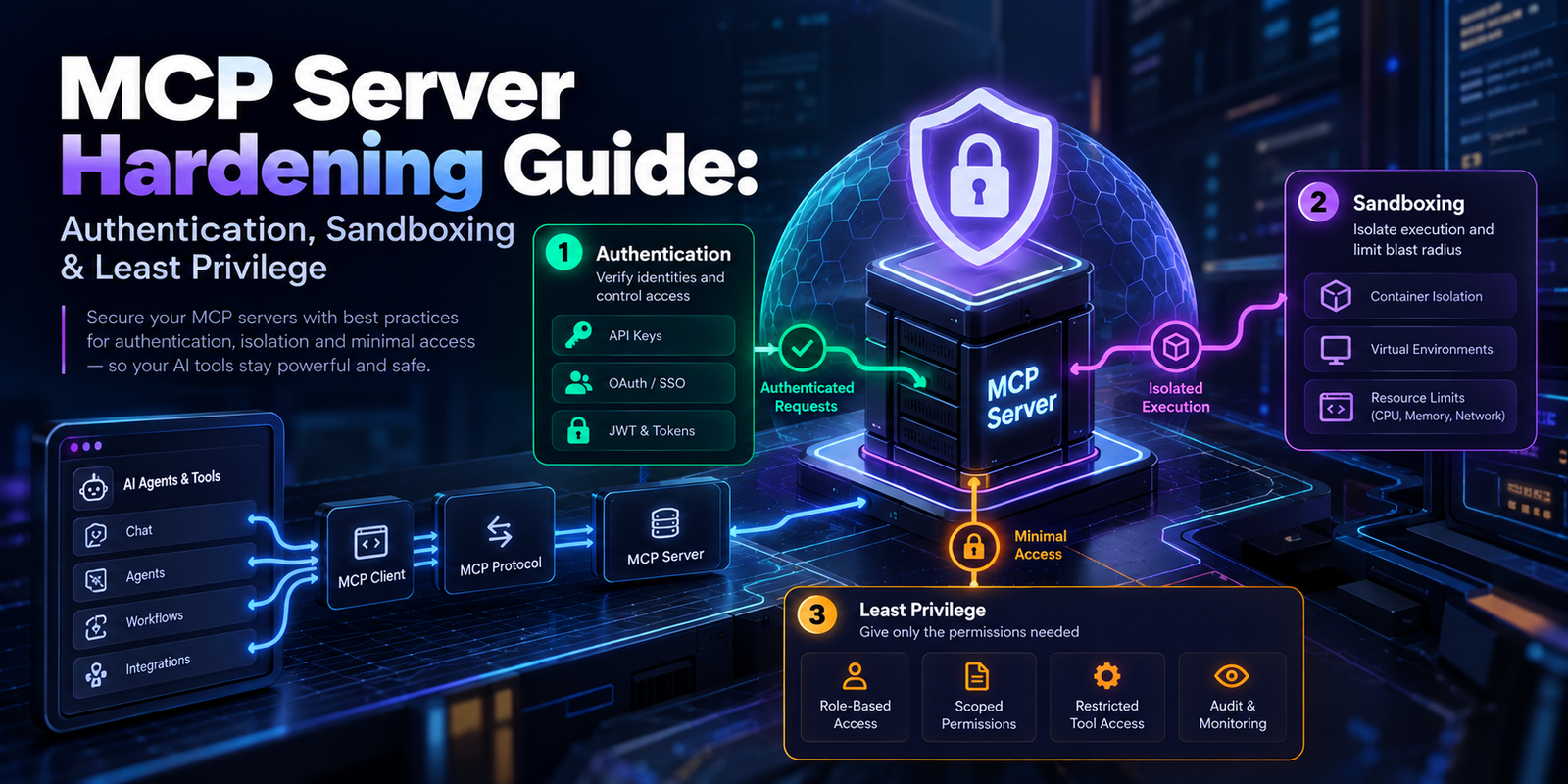
This MCP Server Hardening Guide explains how to secure an MCP server in production using authentication, authorization, sandboxing, least privilege, input validation, tool integrity controls, and monitoring.
The recommendations below are aligned with current MCP security guidance and OWASP security guidance for MCP and agentic AI systems.
What Is MCP Server Hardening?
MCP server hardening is the process of reducing the attack surface of an MCP deployment and adding controls that prevent unauthorized access, privilege escalation, data exfiltration, malicious tool execution, and unsafe interactions with external systems.
A hardened MCP deployment should assume that:
- Tool inputs may be influenced by untrusted model output.
- Tool responses may contain malicious or misleading instructions.
- Third-party MCP servers may be compromised or modified after approval.
- Credentials can be abused if they are broader than necessary.
- A successful prompt injection can attempt to turn a low-risk tool into a path toward a high-impact action.
OWASP specifically identifies risks such as tool poisoning, rug-pull attacks, confused-deputy problems, excessive permissions, supply-chain attacks, data exfiltration, and sandbox escapes in MCP environments.
MCP Server Security Architecture
A useful security model is:
User → AI Host → MCP Client → MCP Server → Tool → External Resource
Security should not depend on the LLM behaving correctly. The server and execution environment must enforce authorization and technical boundaries independently of the model.
For example, a system prompt saying “never access /etc” is not an adequate filesystem security boundary. The operating system, container, sandbox, or application authorization layer should make that access impossible.
1. Enforce Authentication on Remote MCP Servers
Do not expose a production remote MCP endpoint as an unauthenticated service unless the endpoint is intentionally public and every exposed operation is designed for anonymous access.
For protected remote MCP servers, implement an appropriate OAuth-based authorization flow and verify access tokens on the server.
Validate More Than Token Presence
Authentication should establish who is calling the server, but authorization must establish what that caller is allowed to do.
At minimum, validate:
- Token signature and cryptographic validity.
- Issuer.
- Audience/resource binding.
- Expiration and relevant token timestamps.
- Required scopes or permissions.
- User or service identity.
- Session context where applicable.
Current MCP authorization guidance emphasizes that MCP servers must validate that access tokens were issued for the server rather than simply accepting arbitrary bearer tokens.
Use Short-Lived Credentials
Prefer short-lived access tokens and narrowly scoped credentials over long-lived, highly privileged secrets. If a credential is compromised, reducing its lifetime and scope reduces the potential blast radius.
2. Apply Least Privilege at the Tool Level
Least privilege is one of the most important MCP security controls.
An MCP server should have only the permissions required for its intended job. More importantly, individual tools should not automatically inherit unrestricted access to every resource available to the server.
For example, instead of exposing:
execute_command(command: string)consider narrowly scoped operations such as:
get_build_status()
read_project_file(path)
run_tests(test_name)
deploy_service(service_id)
The second design gives your authorization layer much more control over what the agent can actually do.
Use Separate Read and Write Permissions
Where practical, distinguish between:
- Read-only operations.
- Data modification.
- Administrative operations.
- Destructive operations.
- External communication.
- Financial or transactional actions.
An AI agent that only needs to retrieve customer information should not automatically receive permission to delete customers, send emails, modify billing records, or execute arbitrary SQL.
3. Sandbox MCP Servers
Sandboxing creates a technical boundary between an MCP server and the host system.
For local or code-executing MCP servers, consider running the server inside a container or another appropriate isolation mechanism with:
- A non-root user.
- A read-only filesystem where practical.
- Restricted filesystem mounts.
- No access to host credentials.
- Restricted outbound network access.
- Resource limits for CPU and memory.
- Explicitly allowed system capabilities.
Do not assume that a container automatically makes an application secure. Container configuration, mounted volumes, Linux capabilities, secrets, networking, and the container runtime all matter.
Restrict Filesystem Access
If an MCP tool only needs access to a project directory, do not mount the entire host filesystem.
For example, prefer a narrowly scoped directory such as:
/workspace/projectover giving the MCP process unrestricted access to:
/The principle is simple: the MCP server should not be able to access data that its tools do not require.
4. Restrict Network Access
Network-enabled MCP tools create another important attack surface, particularly when an LLM can influence URLs or request destinations.
An attacker could attempt to manipulate a URL-fetching tool into reaching an internal service, cloud metadata endpoint, localhost service, or other restricted network destination.
To reduce SSRF risk:
- Allowlist permitted domains where possible.
- Block localhost and private network ranges when they are not required.
- Validate redirects.
- Restrict outbound ports.
- Apply network egress policies at the infrastructure layer.
- Do not allow arbitrary URLs merely because the model requested them.
Network policy should be enforced outside the LLM. A prompt saying “only access public websites” is not a network security control.
5. Validate MCP Tool Inputs
Every tool parameter should be treated as untrusted input.
This is particularly important because the value may be generated by an LLM after processing external content.
Validate:
- Data types.
- Length limits.
- Allowed values.
- Paths.
- URLs.
- Identifiers.
- SQL parameters.
- Shell arguments.
- File extensions.
Use strict schemas instead of accepting arbitrary objects or command strings.
Avoid Generic Execution Tools
A generic shell tool such as:
run(command: string)can effectively become remote code execution when exposed to an AI agent.
If command execution is unavoidable, restrict it using allowlists, argument validation, a dedicated execution identity, sandboxing, timeouts, and resource limits.
6. Treat Tool Descriptions as an Attack Surface
MCP tool descriptions are not merely documentation. They can become part of the context consumed by an AI model.
OWASP documents MCP tool poisoning as an attack in which malicious instructions can be embedded in tool descriptions or tool responses to manipulate an AI agent.
Security review should therefore include:
- Tool names.
- Tool descriptions.
- Parameter descriptions.
- Input schemas.
- Return schemas.
- Behavior of the implementation.
Do not treat a tool as trustworthy simply because its name looks legitimate.
7. Protect Against MCP Rug-Pull Attacks
A rug-pull attack occurs when a previously trusted tool changes its behavior after approval.
For example, a tool could initially appear to be a harmless document-search function and later be modified to request sensitive information or perform unexpected actions.
For higher-risk environments, consider maintaining an approved inventory of MCP servers and tools and detecting unexpected changes to tool definitions.
Useful controls include:
- Version pinning.
- Dependency pinning.
- Tool-definition snapshots.
- Schema change detection.
- Code review.
- Artifact integrity verification.
- Continuous security scanning.
8. Validate Tool Outputs
Security validation should not stop at the input boundary.
Tool output may be consumed by an LLM and subsequently influence another tool call. That makes output a potential injection and data-flow boundary.
Where possible:
- Return structured data.
- Use strict JSON schemas.
- Limit output size.
- Remove unnecessary sensitive information.
- Validate values before passing them to downstream tools.
- Clearly separate data from instructions.
Do not assume that information returned by an external MCP server is trustworthy merely because the server itself was approved.
9. Add Human Approval for High-Impact Actions
Some operations should require explicit user confirmation even when the agent has technical permission to perform them.
Examples include:
- Deleting data.
- Sending external emails.
- Making financial transactions.
- Publishing content.
- Changing production infrastructure.
- Sharing sensitive documents.
- Granting permissions.
The confirmation interface should show enough information for the user to understand what will happen, including important parameters and the target resource.
10. Protect Secrets and Credentials
Never give every MCP tool access to the same credential set.
Instead:
- Use separate credentials per integration.
- Use narrow scopes.
- Store secrets in a dedicated secret-management system.
- Rotate credentials.
- Avoid hardcoding secrets in MCP source code.
- Prevent secrets from appearing in logs.
- Use short-lived credentials where possible.
An MCP server that can access GitHub, production databases, cloud credentials, email, and payment systems through one shared identity has an unnecessarily large blast radius.
11. Log and Monitor MCP Tool Calls
Production MCP deployments should provide enough telemetry to investigate suspicious behavior.
Useful security events include:
- Authentication failures.
- Authorization failures.
- Tool invocations.
- Tool execution duration.
- Target resources.
- Validation failures.
- Unexpected network requests.
- Permission changes.
- Tool-definition changes.
- Abnormal error rates.
Be careful not to log credentials, access tokens, sensitive user data, or complete confidential prompts unnecessarily.
12. Dependency and Supply-Chain Security
Your MCP server is also an application dependency chain.
Review:
- MCP SDK versions.
- Third-party packages.
- Container base images.
- Operating-system packages.
- External APIs.
- Plugins and extensions.
- Third-party MCP servers.
Pin dependencies where appropriate, scan for known vulnerabilities, and establish a process for applying security updates.
MCP Server Hardening Checklist
Use this checklist before moving an MCP server into production:
- ☐ Remote MCP endpoints require authentication.
- ☐ Access tokens are validated for issuer, audience, expiry, and scope.
- ☐ OAuth permissions are narrowly scoped.
- ☐ Every tool has an explicit authorization policy.
- ☐ Read and write operations are separated where practical.
- ☐ Sensitive tools require additional approval.
- ☐ MCP processes run with minimum operating-system privileges.
- ☐ Local servers are sandboxed or containerized where appropriate.
- ☐ Filesystem access is restricted.
- ☐ Network egress is restricted.
- ☐ SSRF protections are implemented.
- ☐ Tool inputs are strictly validated.
- ☐ Tool outputs are validated before downstream use.
- ☐ Tool descriptions and schemas are reviewed.
- ☐ Changes to trusted tools can be detected.
- ☐ Secrets are stored securely and scoped per integration.
- ☐ Dependencies are monitored for vulnerabilities.
- ☐ Tool invocations are logged and monitored.
- ☐ Sensitive information is redacted from logs.
- ☐ Incident-response procedures exist for compromised MCP servers.
Production MCP Security: Defense in Depth
The safest architecture does not rely on one security mechanism.
Instead, combine:
Authentication → Authorization → Least Privilege → Input Validation → Sandboxing → Network Controls → Output Validation → Human Approval → Monitoring
If a malicious instruction reaches the model, it should still fail to access resources that the model is not authorized to use. If a tool is compromised, sandboxing and network controls should limit its reach. If credentials are stolen, narrow scopes and short lifetimes should reduce the damage.
Final Thoughts
MCP makes it much easier for AI applications to interact with real systems, but that convenience changes the security model. An MCP server is not simply another API endpoint: its tools may be selected and parameterized by an AI model, and its outputs can influence subsequent agent behavior.
The core security principle is therefore straightforward: never make the model the final security boundary.
Enforce permissions at the server, application, operating-system, container, and network layers. Give every tool only the access it needs, isolate high-risk execution, validate data at trust boundaries, and continuously monitor what your MCP infrastructure is doing.
Sources and Further Reading
- OWASP MCP Security Cheat Sheet
- OWASP: A Practical Guide for Secure MCP Server Development
- OWASP: MCP Tool Poisoning
- Model Context Protocol
Last reviewed: September 2026. MCP specifications, SDKs, and security guidance evolve quickly; review the current specification and security documentation before deploying security-sensitive systems.